
Building a Favicon That Isn't Blurry on a Retina Screen
A single small favicon.ico used to be enough for the whole web. It hasn't been for years, and treating it as enough is why so many icons look blurry.
By PulsarKit · ·
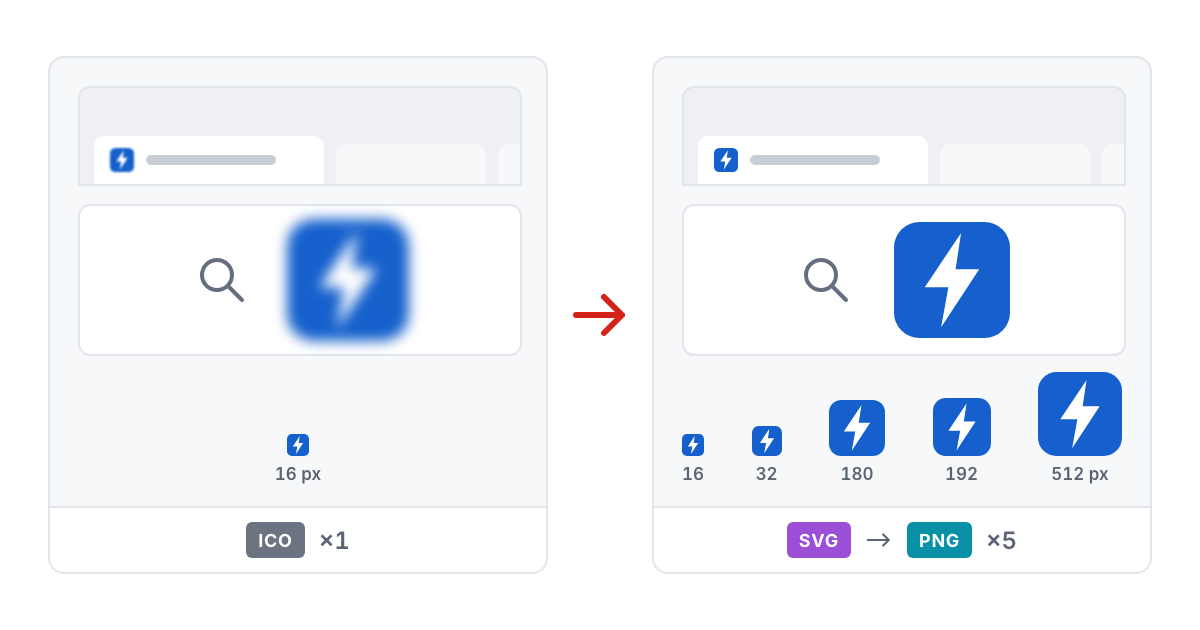
One small icon file was never going to cover every screen
A browser tab, a home screen shortcut on a phone and an app icon on a high-density laptop display each ask for a different pixel size. A single small icon stretched to fit all of them looks sharp in one of those places and soft everywhere else. The traditional favicon.ico, which browsers still request from the root of a site, is still part of the answer. But it was made for a web where screens had far lower resolution than they do now, and it was never meant to be the only file involved.
Why a full icon set has this many separate files
A proper set, the kind Favicon Generator produces from one source image, covers several purposes at once, not just several sizes of the same purpose. There are 16 and 32 pixel PNGs for browser tabs at normal and high pixel density, a 180-pixel icon for when someone adds a site to an iPhone home screen, and 192 and 512-pixel icons that a progressive web app manifest has to reference before the app can be installed at all. Each size is there because something asks for that size. It isn't redundancy for its own sake. Skip one of them and that one surface falls back to a blurrier substitute, or to nothing at all.
The one file that deliberately can't stay transparent
iOS does not composite a transparent home screen icon over anything sensible when someone adds a site to their phone. It fills every transparent area with solid black, so a clean logo on a transparent background turns into a dark, ugly tile the moment it lands on the home screen. The icon meant for that spot needs its transparency flattened onto a real background colour ahead of time, on purpose, instead of being left transparent like the other sizes in the set. Every other icon can keep transparency wherever the source image has it, because a browser tab or a desktop shortcut renders it correctly.
Why a vector source produces a sharper 16-pixel icon
A logo built as an SVG (a flat bitmap logo can be traced into one with PNG to SVG) can be rendered fresh at each target size from its vector shapes, rather than being generated once at a large size and then shrunk repeatedly for every smaller variant. The difference shows most at the smallest size in the set. A logo downsampled from one large master bitmap tends to turn to mush at 16 pixels, and thin strokes and fine details disappear. A version rendered from the vector paths at that same small size keeps its strokes crisp, because it was never a larger image being shrunk. It was drawn at that size from the start, which is also why a single icon rendered by hand goes through SVG to PNG at exact pixel dimensions rather than through an image resizer. For a logo with a thin wordmark or a fine outline, that is the difference between an icon you can recognise in the tab bar and a grey smudge.
A maskable icon exists because Android doesn't respect an icon's shape
Android crops an installed app's icon into whatever shape a particular device or launcher has chosen: a circle, a rounded square, a squircle. It does this regardless of the shape the icon was drawn with, so an ordinary square icon can lose important content right at the edges, depending only on which shape happened to be applied. A maskable icon avoids that problem by keeping all of its meaningful content within roughly the middle eighty percent of the image. That leaves a safe margin around every edge, which any shape can crop away without losing anything that mattered in the design.
Common mistakes: a small source, and a set that never gets linked
A blurry icon set rarely starts in the generator. Every size is built from a 512-pixel master, so any smaller source is stretched to reach it, and one under about 260 pixels has to be blown up to double its size or more, which leaves the large sizes soft. Start from at least 512 by 512, or better from an SVG; a source under 32 pixels is refused outright. The second decision is how a non-square logo becomes square: cropping from the centre keeps the mark large but can clip a wide wordmark, while fitting the whole image and padding the sides with a colour keeps everything visible at the cost of a smaller mark. For a logo much wider than it is tall, a square symbol-only version is usually a better source than the full lockup. The third mistake happens after generating. The eight files, nine with the maskable icon, go at the root of the site, and the tags from head-snippet.html go into the head of every page; if the files live in a subfolder, edit the href values in the snippet to match, or the tags point at files that are not there. Finally, check the 16-pixel icon in a real browser tab rather than an image viewer: at that size a thin outline or a wordmark turns into a grey smudge, and the fix is a simpler mark, not a sharper export.
Tools used in this article
 Favicon GeneratorTurn one logo into the whole favicon set: every PNG size, a multi-size ICO, a manifest and the HTML tags to paste into your head.
 PNG to SVGTrace a PNG into a scalable SVG in your browser. It suits logos and flat icons with a handful of colours, not photographs.SVG to PNGRender SVG files to PNG at any scale or exact pixel size in your browser. Scripts and external links are stripped before anything is drawn.
Read next
- WebP vs AVIF vs JPEG, Measured on One Phone PhotoWe ran one 12-megapixel phone photo, a screenshot and a transparent logo through JPEG, WebP and AVIF in the browser. Here are the file sizes at matched quality, the encoding times and the traces each format leaves.
- US Visa Photo 2 × 2 Inches: Making the 600 × 600 File at HomeA US visa photo is a 2 × 2 inch square; online, it is a JPEG of 600 to 1200 pixels a side, no heavier than 240 kB. Here is the path from a phone photo to that file, with numbers from one run.
- An iLoveIMG Alternative for Image Jobs: What Matches, What Is MissingOn October 20, 2026, we matched the 13 tool cards on iLoveIMG's home page against PulsarKit. 11 had a counterpart; Upscale Image had none, and Blur face only came close.